

Llamagate: A Gateway in Front of My Home Lab's Ollama
Llamagate is a transparent reverse proxy for Ollama that adds token usage counting today, with observability and access control on the roadmap — built for small, self-hosted Ollama setups like a home AI lab on an NVIDIA DGX Spark.
Every home AI lab reaches a point where the model works fine, and the actual problem becomes everything around the model. That’s where this post starts.
The problem I actually had
My DGX Spark runs Ollama serving a couple of local models — gpt-oss:120b as the daily driver, a smaller qwen3:32b for lighter tasks. On top of that sit two very different consumers: a family-facing Open WebUI instance (my wife and three daughters chat with it — it has its own post coming on that), and an autonomous agent running through NVIDIA’s NemoClaw stack, reachable over Telegram.
Ollama is genuinely great at the one job it’s built for: running models. It has no opinion at all about the job right next to that one — telling you what’s actually happening across everyone talking to it. How many tokens did the family use today? Is the agent burning more compute than the chat UI? Ollama doesn’t track any of this once a request is done.
I wanted a number. Just one, to start: tokens today, tokens all-time, across every client, in one place. That’s a small ask, and it turned into the first real piece of infrastructure in this lab that isn’t a model or a UI.
How it evolved (with the appropriate number of wrong turns)
The first version was named token_proxy.py — a Flask script sitting between Open WebUI and Ollama, counting tokens off the wire and writing them to a JSON file. It worked for about a day, in the sense that “worked” meant “hadn’t yet met NemoClaw.”
Once the agent came online, the cracks showed fast. There were a few hiccups where the agent didn’t talk to Ollama’s native API the way Open WebUI did — it spoke OpenAI-compatible /v1/chat/completions, streamed as Server-Sent Events.
Then I moved Ollama off its default port to let the proxy sit transparently in its place, forgot to update the proxy’s own upstream URL to match, and created a beautiful, CPU-pegging infinite loop of the proxy forwarding requests to itself. Somewhere in the same session I also managed to spin up two duplicate NemoClaw sandboxes sharing one Telegram bot token, which Telegram, reasonably, does not support. None of this was the tool’s fault. It was 1 a.m. and I was moving fast through a stack with several new moving parts at once. The lab doesn’t forgive that, and it shouldn’t.
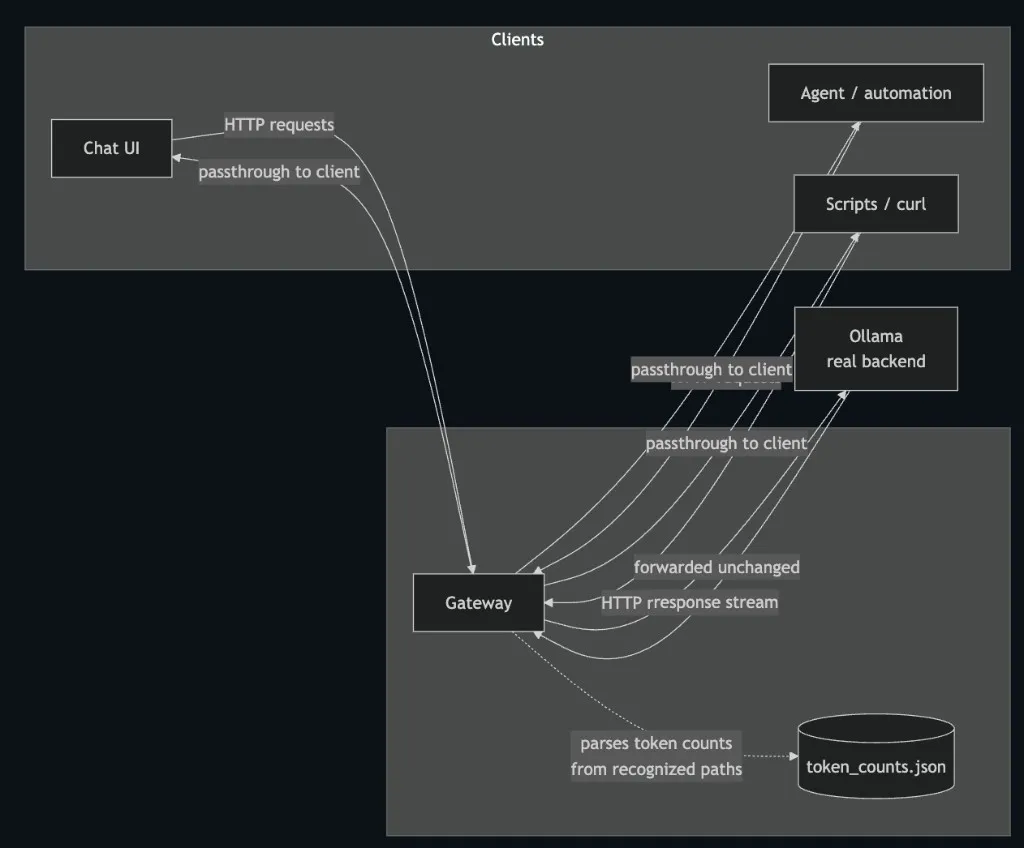
What came out the other side was worth the bruises: a proxy that correctly distinguishes Ollama’s native NDJSON streaming from OpenAI-style SSE, counts tokens from whichever format shows up, and critically always forwards the original bytes downstream untouched. Counting is a side effect, never a mutation.
Why it’s called Llamagate
Somewhere around the third rename I decided ollama-proxy had all the captivating personality of a firmware update. It needed a name that admitted what it actually is: the one gate every request to the llama in the room has to pass through. Llamagate. It counts what comes through the gate today. That’s not where it stops.
Where this is going
Token counting was never the point — it was the smallest useful thing I could ship first, and I wanted to show the token counts in my DGX widget on The Lab. The actual gap I want to close is that small, self-hosted Ollama setups like mine have no observability or security layer at all, by default. You get a fast model and nothing else. Anthropic-scale deployments have this solved with real infrastructure behind them; a DGX Spark on a desk does not.
The roadmap, roughly in the order I’ll actually get to it:
- Request logging — not just counts, but a real trail of what asked for what
- Per-client usage breakdowns — is this the family chat or the agent burning tokens right now
- Rate limiting — so one runaway agent loop can’t monopolize the GPU (ask me how I know this matters)
- Access control — a gate should eventually be able to say no, not just watch
All of it hangs off the same design decision that saved me during the SSE incident: llamagate inspects traffic, it doesn’t rewrite it. Every future feature gets to hook into that same observation point without touching what clients actually receive.
Try it
The repo’s up at github.com/NiranEC77/llamagate — README has the full architecture, a Mermaid diagram of the request flow, and a walkthrough for the typical deployment (move Ollama to an internal port, let llamagate take its old address, and every existing client — chat UI, agent, curl script — gets gatewayed for free, no reconfiguration).
If you’re running Ollama in a small, self-managed environment and have felt the same “I have no idea what’s actually happening on this box” gap, it’s built for exactly that. Contributions and issues welcome — this is very much a lab project growing up in public.